Laelo Unlock Tool For Samsung is a direct unlock tool access service for supported Samsung Exynos phones. After your order is completed, you will receive a username and password to access the tool portal, download the software, and use the available unlock option for compatible models.
This service is mainly for users and technicians who already understand Samsung unlocking basics. Model support can depend on the exact phone model, chipset, Android version, firmware, and security patch.
Important: Please do not order only by phone name such as “Samsung S10” or “Samsung A series”. Always check the exact Samsung model number and compatibility before placing the order.
Samsung unlock support can change over time. A model may be supported on one firmware or security patch, but not supported on another.
Please check these details before ordering:
Note: This service is for supported Samsung Exynos models only. It does not mean every Samsung phone can be unlocked.
Place your order on Bregsm. After your order is completed, you will receive your username and password.
After your order is done, open this link:
https://user.infinity-box.com/news/
Login there with the username and password received after your order.
After login, click on Products.
Then click on Unlock Codes & Services.
Find this service:
Samsung Unlock Tool Laelo
Then click the available buy or access option.
Inside the portal, you can see the software Download option.
Download the tool and follow the instructions carefully.
Download Password Note: The default password for the tool download is 12345678.
You can also see the username and password inside your account area.
Use those details to login to the tool and unlock your supported Samsung device.
Make sure your Samsung USB drivers, cable, PC, and internet connection are working properly before starting.
Please check the supported model list here:
http://forum.gsmhosting.com/vbb/f296/samsung-exynos-direct-unlock-test-2602453/
Important: This link is for reference. Supported models and security patches may change. If you are not sure, ask before ordering.
This service does not guarantee that every Samsung phone can be unlocked. Unlock success depends on device support, firmware, security patch, tool access, and correct user handling.
Use this service only for phones you own or are authorised to service. Do not use unlocking tools on stolen, blocked, blacklisted, or unauthorised devices.
If you face any login, account, or tool access issue, login here:
https://user.infinity-box.com/news/
Login with your username and password.
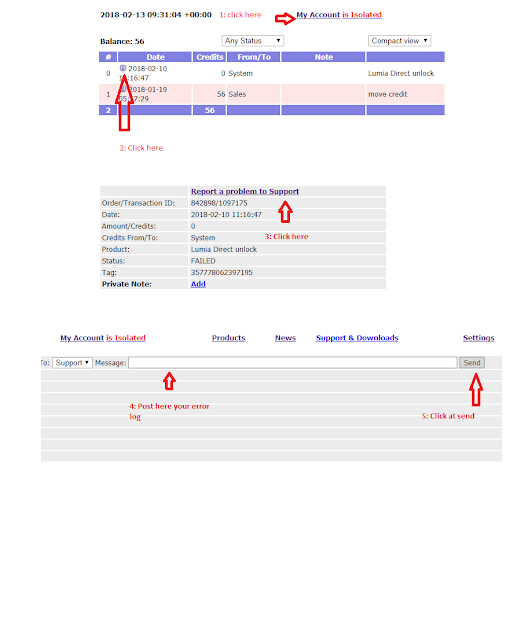
Then click on My Account and follow the image below.
If the issue continues, contact support with your order number, username, Samsung model number, and a screenshot of the error.
Bregsm provides mobile unlocking-related services with clear order handling and practical guidance.
For this service, you receive access instructions, login guidance, download steps, and basic support if there is an order or account access issue.
To avoid mistakes, please check compatibility before ordering.
Delivery time: 1-12 Hours
Service type: Server
Submit to verify allowed: No
Cancellation allowed: No
Order processing: Manual